
Help Your map
Render area and dimensions
Choose which dimensions are mapped, how much of each, and how far visitors can zoom. Changes here take effect at the next render.
The area box
Open your world, then Render area and dimensions. The map shows your world with a green box: that's what gets mapped. The dashed outline is what's mapped now.
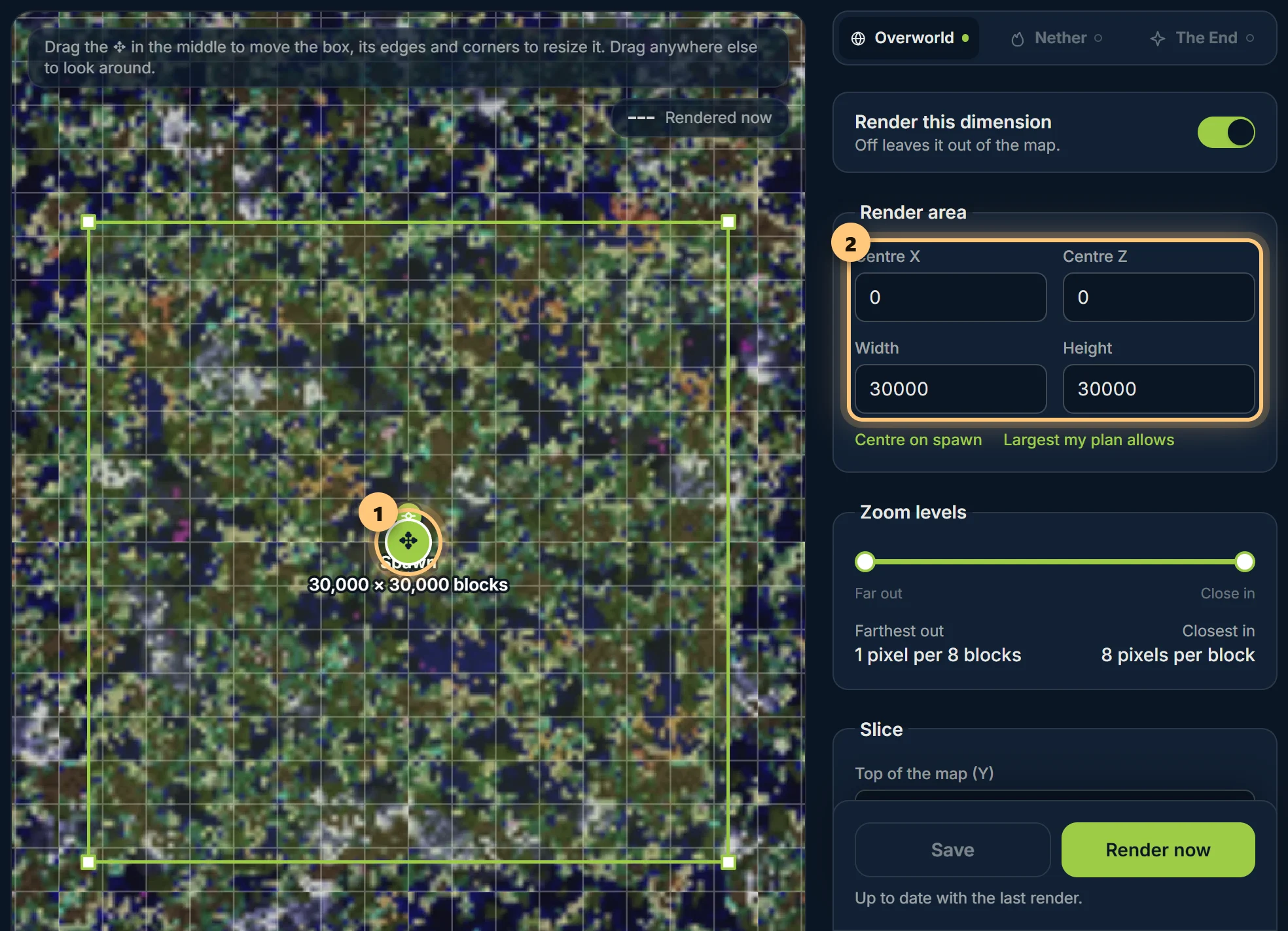
- Move the box with the grip in its middle. Dragging anywhere else moves the map, so you can look around even when the box fills the screen.
- Resize it from its edges and corners. It snaps to whole chunks (16 blocks), and can't grow past your plan's limit: 1,500 blocks a side on Free, 30,000 on Premium.
- Centre on spawn puts the box back round the world's spawn.
The darker land around your world is what its seed would generate there: it shows where there's land before you make the area bigger. It isn't mapped, and doesn't count.
Dimensions
Each dimension has its own tab, with its own area. Switch one off with Render this dimension if nobody needs to see it. A dimension your world doesn't have yet (nobody's been to the End) has a hollow tab; it can be mapped once it's been visited and you upload again.
Zoom
The zoom slider sets how far out and how far in visitors can go, in plain words, like "4 pixels per block" close in. Premium maps go further each way. Zooming further in than the render makes blocks bigger without new detail.
Slices and X-ray
- Top of the map (Y) cuts the map off at that height, so it shows what's under roofs, or the caves under a mountain.
- X-ray, in the Nether, leaves out netherrack, so the map shows the Nether's caves, fortresses and bastions instead of solid rock.
Saving and rendering
Save keeps your changes for the next render; to start one, choose Render now in the sidebar. If a render is already waiting in the queue, it uses what you save. If your changes aren't saved and you move to another section, they're kept for you, and the sidebar marks the section with a dot. Reset, beside Save, puts everything back to what's saved.
Ready to make a map, or need to change something?
Open your dashboard