

Help For developers
API and addons
Put markers on a map from outside BedrockMap: death points from an addon, shops from a Discord bot, waypoints from your website.
Two ways in
| You're making | Use |
|---|---|
| A Bedrock addon | Script events, passed on by Bedrock Relay. No key, no internet access, works on Realms. |
| A Discord bot, a website, a Java plugin, a tool | The API, with a key the map's owner makes for you. |
Either way, your markers belong to your app: you only see and change your own, and the map's owner can see what you added and remove it. Markers are a Premium feature, so the map's owner needs Premium.
For map owners
Open your world, then API and addons.
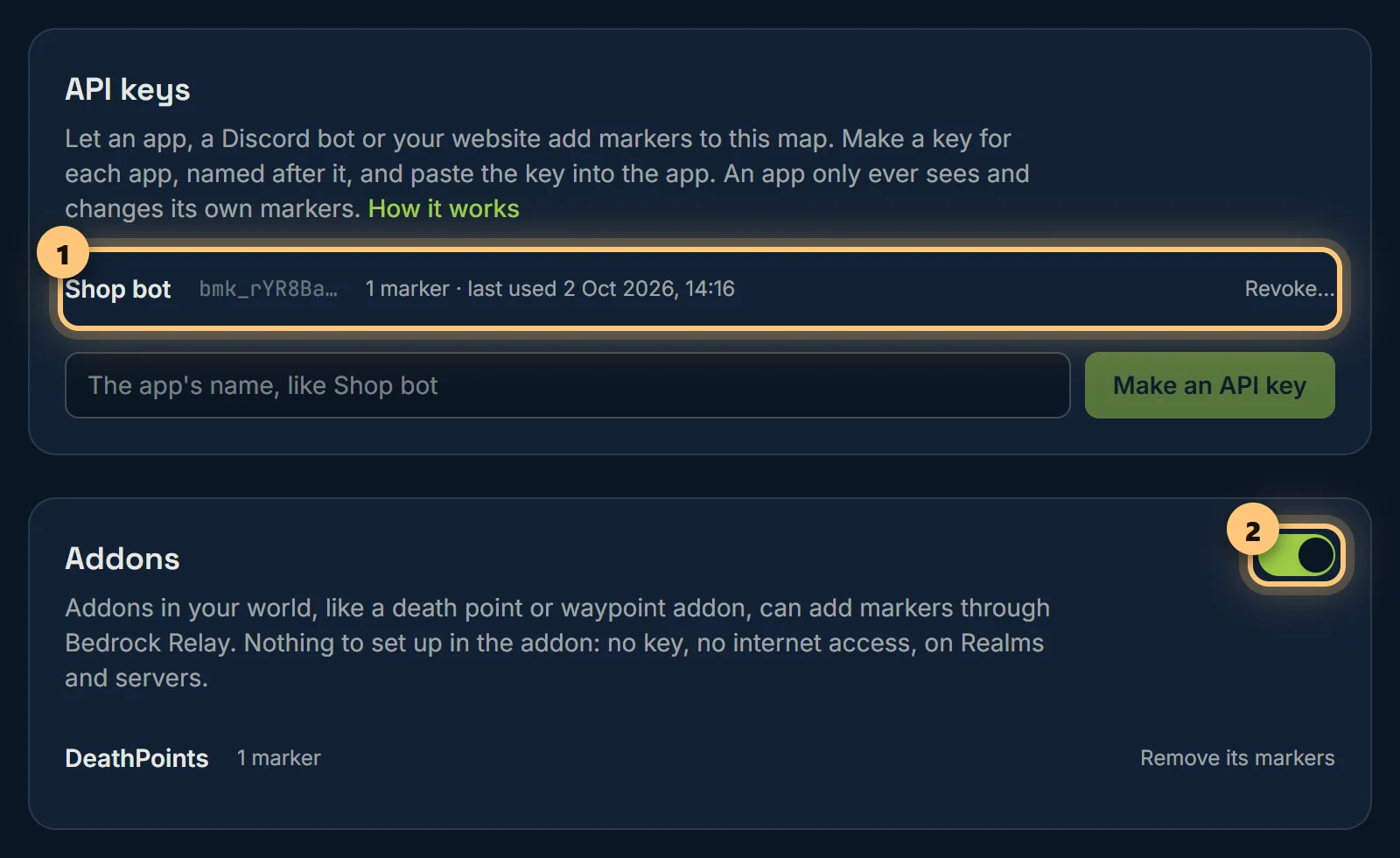
- An app or bot: type its name and choose Make an API key. Copy the key (it's shown once) into the app. Revoke stops it at once, and can remove everything it added.
- Addons work as soon as Bedrock Relay is in your world. Switch off Addons may add markers to stop them, and remove any addon's markers from its line.
- Markers from apps show on the Markers page with who added them, and you can edit or delete them like any other.
From a Bedrock addon
Send a script event; Bedrock Relay, in the same world, passes it to BedrockMap. Your addon needs no key and no internet access, so it works on Realms and servers alike.
import { system, world } from '@minecraft/server';

// A death point: one per player, moved each time they die.
world.afterEvents.entityDie.subscribe(({ deadEntity: p }) => {
  if (p.typeId !== 'minecraft:player') return;
  const at = p.location;
  system.sendScriptEvent('bedrockmap:marker', JSON.stringify({
    app: 'DeathPoints',
    ref: `death:${p.name}`,
    name: `${p.name} died here`,
    x: Math.floor(at.x), y: Math.floor(at.y), z: Math.floor(at.z),
    dimension: p.dimension.id,
    type: 'Graves',
  }));
});

// ...and remove it when they get their things back.
system.sendScriptEvent('bedrockmap:remove', JSON.stringify({ app: 'DeathPoints', ref: 'death:Steve' }));app: your addon's name (letters, numbers, spaces,-and_, up to 32). Owners see it on their map.ref: your own name for the marker, up to 64 characters. Sending the samerefagain moves and renames that marker instead of adding another, so you never need to keep ids. Remove markers byref.dimension:minecraft:overworld,minecraft:netherorminecraft:the_end(whatdimension.idgives you), or justoverworld.nameup to 80 characters; optionalnote(shown when clicked) up to 1,000; optionaltype, one of the map's marker types (icons) by name, likeGravesfor the owner's own "Graves" icon.- Markers stay until you remove them. Tidy up: remove a waypoint when it's no longer needed.
- A script event gets no reply. If the owner has switched addons off, or the map is full, the marker simply isn't added.
Moving a marker every tick is fine: Bedrock Relay passes on the latest one for each ref, a few times a second at most.
The API
Send the map owner's key with every request, as Authorization: Bearer bmk_…. Requests and answers are JSON. Base address: https://bedrockmap.net/api/v1.
GET /world | The key's map: its name, address, whether it's public, and its dimensions. |
GET /marker-types | The marker types: as in v1, a type is an icon, the built-in ones (home, farm…) then the owner's own (custom:31), each with its name. Give a marker one with type, by id or by name. |
GET /markers | Your markers, newest first. ?ref= for one. |
POST /markers | Add one. With a ref you've used before, it replaces that marker (200) instead of adding (201). |
GET /markers/<id> | One of yours, by id, or by ref:<ref>. |
PATCH /markers/<id> | Change some of its fields. |
DELETE /markers/<id> | Remove it. /markers/ref:death:Steve works too. |
POST /players | Who's online, from a plugin or mod: {"complete": true, "players": [{"name", "uuid", "dimension", "x", "y", "z"}]}. With complete, anyone you sent before and leave out has left. Our Java plugin does this for you. |
GET /players | Who's online now, as visitors to the map see them, for a website or bot. |
curl https://bedrockmap.net/api/v1/markers \
  -H "Authorization: Bearer bmk_…" -H "Content-Type: application/json" \
  -d '{"ref":"shop:carrots","name":"The Golden Carrot","dimension":"overworld","x":-130,"z":165,"type":"Shop","note":"Open whenever Mia is on."}'
{
"marker": {
"id": 412, "ref": "shop:carrots", "dimension": "overworld",
"x": -130, "y": null, "z": 165, "name": "The Golden Carrot", "note": "Open whenever Mia is on.",
"type": "shop", "icon": "shop", "colour": "#e0a030",
"mapUrl": "https://bedrockmap.net/map/cherry-valley-smp#-130,165,2",
"createdAt": "2026-10-02T14:00:00.000Z", "updatedAt": "2026-10-02T14:00:00.000Z"
}
}Fields: dimension, x, z, optional y, name, optional note, ref, and either type (its icon, by id like shop or custom:31, or by name like Shop or the owner's Graves) or icon (the same ids), and optionally colour (#rrggbb, the pin's colour for a built-in icon).
Errors
401 unknown, revoked | A wrong key, or one the owner revoked. |
402 premium | The map's owner isn't on Premium. Reading still works, and so does removing. |
403 limit | The map has as many markers as its plan allows. |
404 not-found | Not one of your markers. |
400 invalid | message says which field, and why. |
429 rate-limited | Up to 10 requests a second and 600 a minute per key. Wait for Retry-After seconds. |
Keep keys secret: in your bot's or server's settings, never in a web page, a pack or anything you share. Anyone with a key can add markers to that map.
Ready to make a map, or need to change something?
Open your dashboard