

Help With Bedrock Relay
Markers from in game
Players add markers where they stand, from a menu in Minecraft. They're on the map straight away, with the player's name.
Setting it up
A Java server? Our plugin does this with /bedrockmap marker add: see Java servers.
- Connect your world through Bedrock Relay.
- In Bedrock Relay, add the Map markers plugin to your world, from its Plugins tab. It's only offered once your world has a map.
- On BedrockMap, choose who may place markers, on your world's Markers from in game page (under Integrations): anyone, only the players you list, or nobody.
It's worth making some marker types first: players pick one when they add a marker.
In game
A player types /relay in chat, and the Map markers menu opens:
- Add a marker here: a name, a description and a type. The marker goes where they're standing, and they're told the link to see it on the map.
- My markers: the markers they've added, which they can delete. Markers you added on the website are shown but can't be deleted from the game.
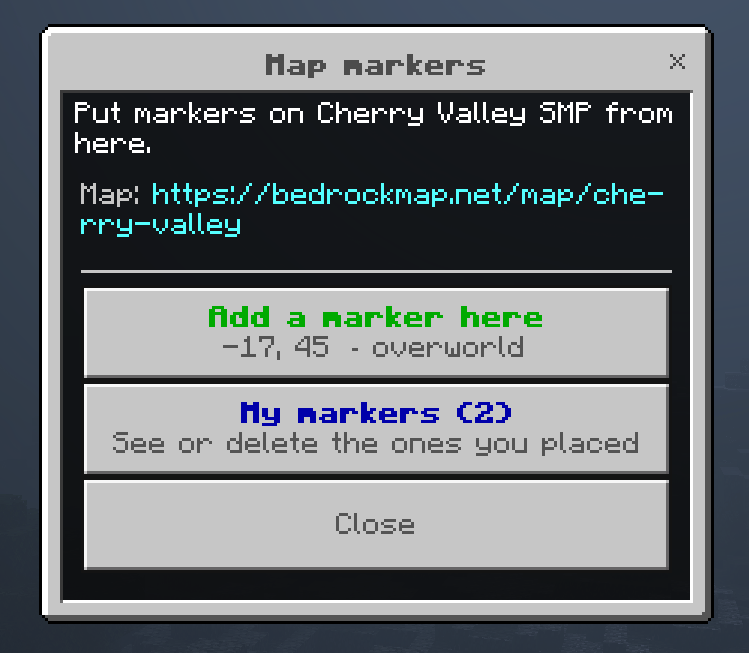
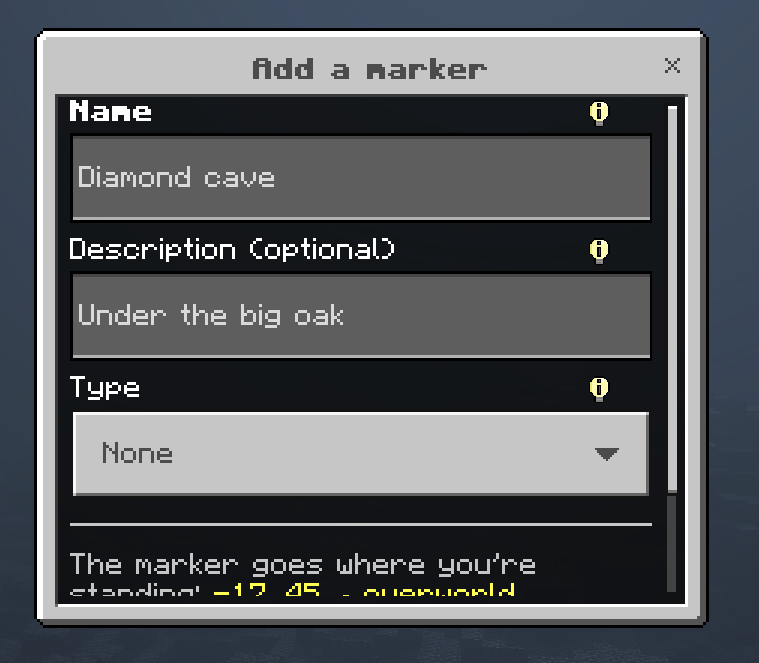
If a player isn't allowed, or the map has as many markers as its plan allows, Add is greyed out and says why.
Managing them
Markers from in game are ordinary markers: you can edit, restyle or delete them on the Markers page, where each shows who placed it.
Ready to make a map, or need to change something?
Open your dashboard