

Help Java servers
Java servers
Our plugin shows everyone on your Java server on the map as they move, lets players add markers where they stand, and sends the world so the map keeps itself up to date. It's what Bedrock Relay does for Bedrock worlds.
What it does
- Live players: everyone online, on the map within a few seconds, with the face from their skin. Players who join through Geyser from Bedrock show too.
- Markers from in game: players add a marker where they stand with a command, and remove their own.
- Auto-sync: the plugin sends a fresh copy of the world on a schedule, and the map renders itself. See Keeping the map up to date.
- The world's time (version 2.2.0 and newer): the map shows dusk and night when they come on your server. Switch it on on the world's World's time page.
It needs Premium, and a map of your server's world (how to upload it).
Which download
On your world's Live players page there are three:
| Your server | Download | Put it in |
|---|---|---|
| Paper, Spigot or Purpur, Minecraft 1.21 to 26.x | Paper, Spigot or Purpur | plugins |
| Fabric, Minecraft 26.x | Fabric 26.x | mods, with Fabric API |
| Fabric, Minecraft 1.21.11 | Fabric 1.21.11 | mods, with Fabric API |
| Fabric, Minecraft 1.21.8 | Fabric 1.21.8 | mods, with Fabric API |
It only runs on the server: players don't install anything.
Setting it up
- Download the plugin for your server (above), put it in the folder, and restart the server.
- On the Live players page, choose Make a key for the plugin.
- Run the command it shows in the server console, once:
bedrockmap key bmk_…. The console answers Connected to your map's name.
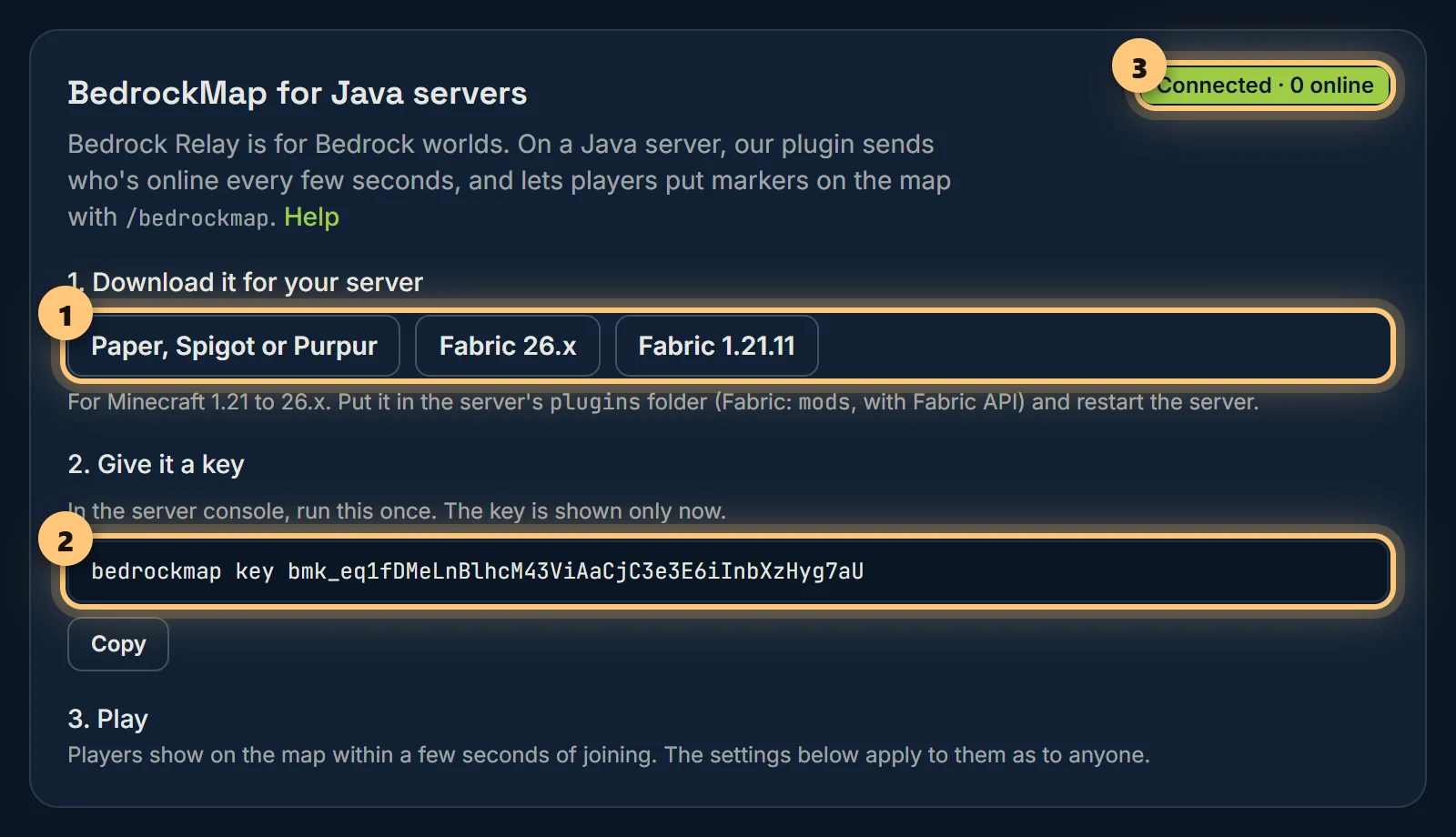
The key is shown only once. If you lose it, make a new one: the old one keeps working until you revoke it on the Developers page. Operators can run the command in game too, but the console keeps the key out of chat.
Who visitors see is set on the same page as for any live players: hide players by name, hide anyone below a height, or switch live players off. See Who visitors see.
Commands
/bedrockmap | The map's link, and whether the server is connected. |
/bedrockmap marker add <name> | A marker where you stand. Its note says who placed it. |
/bedrockmap marker list | Your markers, numbered. |
/bedrockmap marker remove <n> | Removes one of yours, by its number in the list. |
/bedrockmap key <key> | Operators and the console: connects the server to your map. |
/bedrockmap sync | Operators and the console: sends the world now, once auto-sync is on. |
/bmap works as a short form of /bedrockmap.
Markers from in game
- Who may add them follows your world's Markers from in game page: anyone, only the players you list, or nobody.
- Players see and remove only their own. You can edit or delete any of them on the Markers page, where they're marked Added by Java plugin.
- They count towards your plan's marker limit. When it's reached, players are told and nothing is added.
- Revoking the plugin's key on the Developers page can remove every marker it made, too.
Keeping the map up to date
With version 2.1.0 or later, the plugin can send your world to BedrockMap on a schedule, so the map renders itself.
- Set the plugin up as above, with the newest download.
- Open your world's Auto-sync page and choose Use the plugin for auto-sync.
- Choose how often: daily at an hour you pick, every 12 hours, or every 6 hours. Sync now sends it straight away.
When a copy is due, the plugin saves the world and pauses saving for the few seconds it takes to copy it, then uploads the copy in the background. Players won't notice. The console says when it starts and how it went.
- If nobody has played since the last copy, a scheduled one is skipped. If the world hasn't changed, it isn't rendered again and doesn't use one of your renders.
- Only the map is sent: the world's settings and its region files, for the Overworld, the Nether and the End. Players' inventories and the rest stay on your server.
- On Spigot, Paper or Purpur it sends your main world (the one named by
level-nameinserver.properties), with its Nether and End. Other worlds, such as Multiverse ones, aren't sent. - The server needs room for the copy while it uploads, about the size of the world. If there isn't enough, the sync is listed as failed with the reason.
Each sync is listed on the Auto-sync page. If the server was off when one was due, it's skipped and tried again at the next one.
If it isn't working
The card on the Live players page says Connected while the server checks in, and when it was last heard from otherwise. /bedrockmap in game or in the console says the same, with the reason when something's wrong. The console logs a problem once, and again when it's fixed.
| The console says | What to do |
|---|---|
| Not connected yet | The plugin has no key: run the command from Setting it up. |
| That isn't a BedrockMap API key | The key was mistyped, or belongs to nothing. Make a new one and run the command again. |
| This key was revoked by the map's owner | Make a new key on the Live players page. |
| The map's owner isn't on Premium now | Live players need Premium. It reconnects by itself once Premium is back. |
| Couldn't reach BedrockMap | The server can't make web requests out. Some hosts block them: ask yours to allow connections to bedrockmap.net. |
| Nothing at all about BedrockMap | The plugin didn't load. Check it's the right download for your server, that it's in the right folder, and on Fabric, that Fabric API is there too. |
Its settings are in plugins/BedrockMap/config.json (Fabric: config/bedrockmap.json). Besides the key, intervalSeconds is how often it sends who's online: every 5 seconds unless you change it (2 to 60).
The plugin from the old BedrockMap
If your server has the old site's plugin, it keeps working until 31 March 2027. To move to this one, replace the old jar with the new download and give it a key, as above. Then revoke the old key, listed on the Live players page under the old addon.
The same goes for sync from the old site (SFTP or a sync script): it keeps working until 31 March 2027. Choosing the plugin on the Auto-sync page replaces it.
Ready to make a map, or need to change something?
Open your dashboard