
How to pregenerate your world and fill map gaps
Learn how to use the World Pregeneration Tool addon to generate chunks in advance, eliminate missing areas on your BedrockMap, and improve server performance.
What is World Pregeneration?
World pregeneration is the process of generating chunks in your Minecraft world before players explore them naturally. This is especially useful for:
- Complete Map Coverage: Eliminate missing chunks and gaps on your BedrockMap
- Better Performance: Reduce server lag by pre-generating terrain instead of generating it during gameplay
- Smoother Exploration: Players won't experience stuttering when entering new areas
- Event Preparation: Pre-generate spawn areas or event locations before players arrive
Note: This guide uses the World Pregeneration Tool addon, which works on Minecraft Bedrock Edition worlds. The process can take anywhere from a few minutes to several hours depending on the area size.
Prerequisites and Requirements
Before you begin, ensure you meet these requirements:
- Operator (OP) permissions in the world
- Cheats enabled in the world settings
- Access to install behavior packs/addons
- Enough time for the pregeneration to complete (can take hours for large areas)
- Sufficient storage space for the generated chunks
Important: Pregeneration can be resource-intensive. Start with smaller areas to test performance before attempting large-scale generation.
Download the World Pregeneration Tool
Download the addon from CurseForge:
- Visit the World Pregeneration Tool page on CurseForge
- Click the Download button to get the latest version
- Save the
.mcaddonfile to a location you can access
Tip: Make sure to download the correct version that matches your Minecraft version for best compatibility.
Install the Addon
Install the addon on your world:
For Single Player / Local Worlds:
- Double-click the
.mcaddonfile you downloaded - Minecraft will open and automatically import the behavior pack
- Open your world in Minecraft
- Go to Settings → Add-Ons (or Behavior Packs)
- Find the World Pregeneration Tool in the available packs
- Activate it for your world
- Save and reload the world
For Bedrock Dedicated Servers:
- Extract the
.mcaddonfile to get the behavior pack folder - Upload the behavior pack folder to your server's
behavior_packsdirectory - Edit your world's
world_behavior_packs.jsonto include the pack - Restart the server
Success! Once installed, you should see a message in chat confirming the addon is loaded when you join the world.
Plan Your Pregeneration Area
Before running the pregeneration command, plan out what area you want to generate:
Understanding the Parameters:
- Center Position (X, Z): The coordinates at the center of your pregeneration areaExample: X=0, Z=0 for world spawn
- Radius: How many blocks to generate in each direction from the centerExample: Radius of 400 = 800×800 block area (400 in each direction)
- Dimension: Which dimension to pregenerate (Overworld, Nether, or End)
Example Scenarios:
Performance Tip: Start with a radius of 500-1000 blocks to test. Larger areas can take hours and significantly increase world file size.
Teleport to the Target Dimension
For best performance, teleport to the dimension you want to pregenerate:
Teleport Commands:
- Overworld:
/execute in overworld run tp @s [X] ~ [Z] - Nether:
/execute in nether run tp @s [X] ~ [Z] - The End:
/execute in the_end run tp @s [X] ~ [Z]
Replace [X] and [Z] with your target coordinates.
Example:
/execute in overworld run tp @s 0 100 0Why teleport first? Being in the target dimension reduces cross-dimension overhead and improves pregeneration performance.
Run the Pregeneration Command
Now you're ready to start the pregeneration process:
- Open the chat in Minecraft
- Type the following command:
/scriptevent searmr:pregen - Press Enter to run the command
- A form will appear with the following fields:
- Dimension: Select Overworld, Nether, or The End
- Radius: Enter the radius in blocks (e.g., 400)
- X Position: Enter the center X coordinate (e.g., 0)
- Z Position: Enter the center Z coordinate (e.g., 0)
- Fill in all the fields according to your plan
- Click Submit to start the pregeneration
Process Started! You'll see messages in chat indicating the pregeneration has begun.
Monitor Progress
Once pregeneration starts, the addon will take control of your player to force chunk generation:
How It Works: The addon rapidly teleports your player to each chunk location, places and breaks a block, forcing Bedrock Edition to save the chunk. Simply visiting a chunk is not enough to ensure it's saved.
- Progress Updates: You'll see messages in chat showing the current percentage and number of chunks processed
- Rapid Teleportation: Your screen will flash as you're teleported between chunk locations
- No Player Control: You cannot move or perform actions while pregeneration is running
- Completion Message: You'll receive a notification when pregeneration is finished
Estimated Time: A 1000×1000 block area typically takes around 5 minutes. Larger areas will take longer depending on your hardware and the size of the radius.
Important: Do not close the game or log out during pregeneration, as this will stop the process and you'll need to start over.
Upload to BedrockMap
Once pregeneration is complete, upload your world to BedrockMap to see the fully-generated map:
- Wait for the completion message in chat
- Save and exit your world to ensure all chunks are saved
- Export your world following the world preparation guide
- Go to the BedrockMap Dashboard
- Upload your world (or re-upload if updating an existing map)
- Wait for rendering to complete
Result: Your BedrockMap will now show a complete, gap-free map of the pregenerated area with no missing chunks!
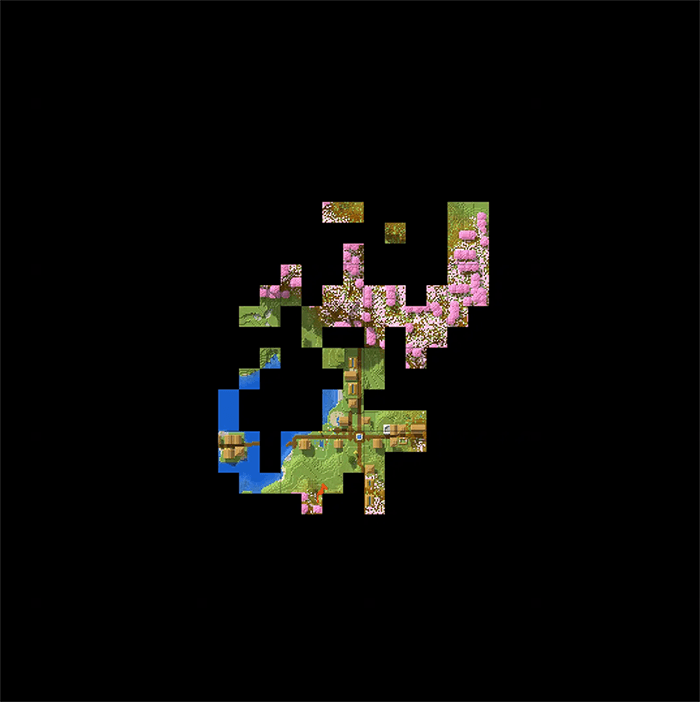
Before and After Comparison
See the dramatic difference pregeneration makes on your BedrockMap. Below is a comparison showing what your map looks like before pregenerating versus after:
Before Pregeneration
Notice the missing chunks and gaps where players haven't explored yet
After Pregeneration
A complete, seamless map with all chunks generated and saved
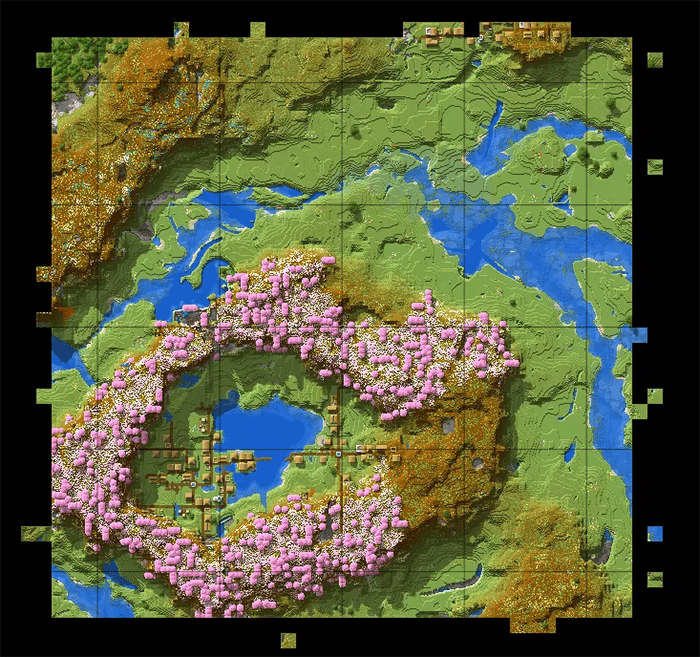
The Difference: Pregeneration ensures every chunk in your specified radius is fully generated and saved, eliminating all gaps and creating a complete, professional-looking map on BedrockMap.
You're all set!
If you have any questions or run into issues, don't hesitate to reach out for support.
Browse more guides →